PokerNow HUD Advanced

See how they play this spot before you act.

Free PokerNow HUD with opponent stats for every spot

PokerNow HUD Advanced is a free Chrome extension that adds a heads-up display with spot-aware opponent stats to PokerNow. It tracks everyone you sit with by their PokerNow ID and, on your turn, shows how each opponent answers your bet sizes.

Add to Chrome

Free. Chrome on a computer. No-Limit Hold’em on pokernow.com (formerly pokernow.club). Not affiliated with PokerNow.

riverrat97bb
CO
3bb
41/30/9AF2.4WTSD31412 h1
RFI52F3B714B3OSz3.0
ManiacTanks, then bets big when bluffing
Theo118bb
BB
Reg19/12TAG
Mika64bb
SB
22/8
Pot 4.5bb
24/19TAG
You100bb
BTN
Facing riverrat’s CO open
You’re BTN · pot 4.5bb · 4 in hand
3-beteveryone folds 54%
riverrat folds 71% · 4-bets 3%
Cold 4-bets: Theo 4% · Mika 0%
If you call · Theo squeezes 9% · Mika squeezes 6%

riverrat opens from the cutoff and it’s on you. Their badge says they open wide and fold to most 3-bets; your panel prices the 3-bet.

Use the arrow keys to move between the numbers and buttons on the table.

An example hand with made-up players. Hover or tap any number to see what it means.
  • Free, with no accountNo paid tier and no ads.
  • Sees only what the table seesActions, bets and cards shown at showdown, plus your own. Never hidden cards.
  • You make every betA size button fills in PokerNow’s bet box. You confirm it.
  • Stored in your browserYour player database and every number the HUD shows. We also do operations on hosted servers. What’s sent

How it sits on PokerNow’s table

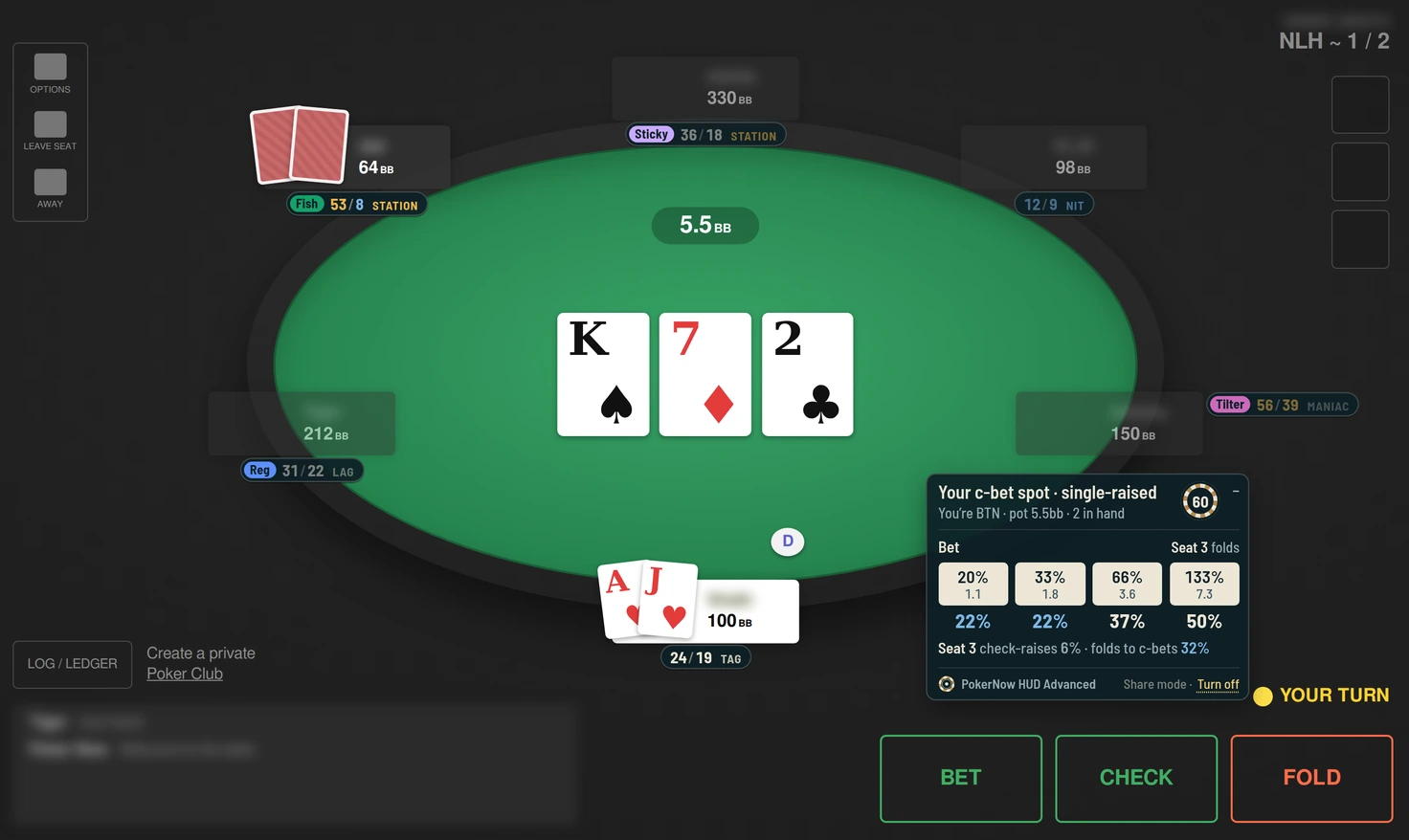
The badges sit by each seat and stay small until they matter. On your turn the panel shows up near PokerNow’s buttons with your bet sizes and how the player you face answers each one.

Pick the HUD’s size in the popup: Auto follows PokerNow’s table and grows with it on bigger windows, or choose 100, 125 or 150%. Anything that would cover PokerNow’s buttons at that size is drawn smaller.

For screenshots, turn on share mode: the HUD calls players by seat, such as “Seat 2”, and hides your notes, while PokerNow’s name plates, chat and the table owner’s name are blurred. It turns itself off after 6 hours.

Drag any badge or the panel out of the way of PokerNow’s own buttons.

A PokerNow-style table in share mode on the flop: seat labels, tags and types on the badges, and fold rates by bet size.
Share mode on a test table laid out like PokerNow’s: seats instead of names, the name plates and chat blurred, and the extension’s name on the panel.
Theo118bb
BB
Reg19/12TAG
Ana92bb
UTG
Nit15/12TAG
Jules140bb
HJ
26/21TAG
Pot 1.5bb
Mika64bb
SB
22/8
You100bb
BTN
24/19TAG
riverrat100bb
CO
41/30/9AF2.4WTSD31412 h1
RFI523B9
ManiacTanks, then bets big when bluffing
Click a badge to open or close it.

Small until it’s their turn

Every seat gets a pill with VPIP (how often they put money in before the flop) and PFR (how often they raise before the flop). When a player is to act, theirs opens with the stats for the spot they’re in and your latest note on them. Click any badge to open it yourself, or drag it out of the way. A thin light outline keeps each badge easy to spot on PokerNow’s table.

A dot on the pill means you’ve written a note on that player.
Your c-bet spot · single-raised
You’re HJ · pot 8bb · 3 in hand
Beteveryone folds
25%
25%
35%
46%
Theo check-raises 14% · folds to c-bets 52%
Mika raises c-bets 17% · folds to c-bets 44%
If you check · Mika stabs 63%
Click the chip to roll it.

Your options, with their answers

On your turn, a panel lists your bet sizes with how often the players still in fold to each one. Those fold rates are its biggest numbers. Under them: who raises, who check-raises, and who bets if you check.

Click a size and PokerNow’s bet box opens with the amount filled in, in big blinds or chips, whichever you play in. You still confirm every bet yourself. The sizes are yours to set: 20, 33, 66 and 133% of the pot to start, opens in big blinds, and 3-bets as a multiple of the raise.

The chip is a randomizer for mixed strategies: a fresh number from 1 to 100 each time it’s your turn.

Colors that point out who’s unusual

A number well above the typical range turns gold, one well below turns blue, and anything from too few hands fades. Hover any number to see what it measures, how many chances it’s from, what’s typical, and how to adjust.

41/30/9AF2.4WTSD31412 h1
RFI52F3B714B3OSz3.0
ManiacTanks, then bets big when bluffing
riverrat · Fold to 3-bet
out of position
71%
22 of 31 opportunities
Opened, then folded to a 3-bet.
Typical 40–65%
Overfolds to 3-bets: 3-bet bluff more.
  1. Whose number, and which statEvery number on a badge or in your panel has one of these.
  2. The spot it countsHere, 3-bets riverrat faced out of position. When a narrow split has too few hands, the HUD uses a broader one.
  3. The numberOn the badge it’s gold when well above the typical range and blue when well below.
  4. How many chancesHow often they’ve been in this spot. Under 12 chances, the number fades.
  5. What it countsThe definition, the same in the HUD and the player database.
  6. What’s typicalThe range the HUD treats as normal for this stat.
  7. How to adjustA general read for numbers outside the range. Every decision is still yours.
  • 71Above the typical range
  • 3Below it
  • 38Too few chances to trust yet

It remembers everyone you sit with

Stats follow each player’s PokerNow ID, so you’ll know the regular from last week even under a new name. The player database has all 139 stats for every player, searchable and split by position, pot type and number of players.

The first time you open a table, it brings in the hands played there before you arrived. Back everything up to a file, your tags included, whenever you like.

See all 139 stats

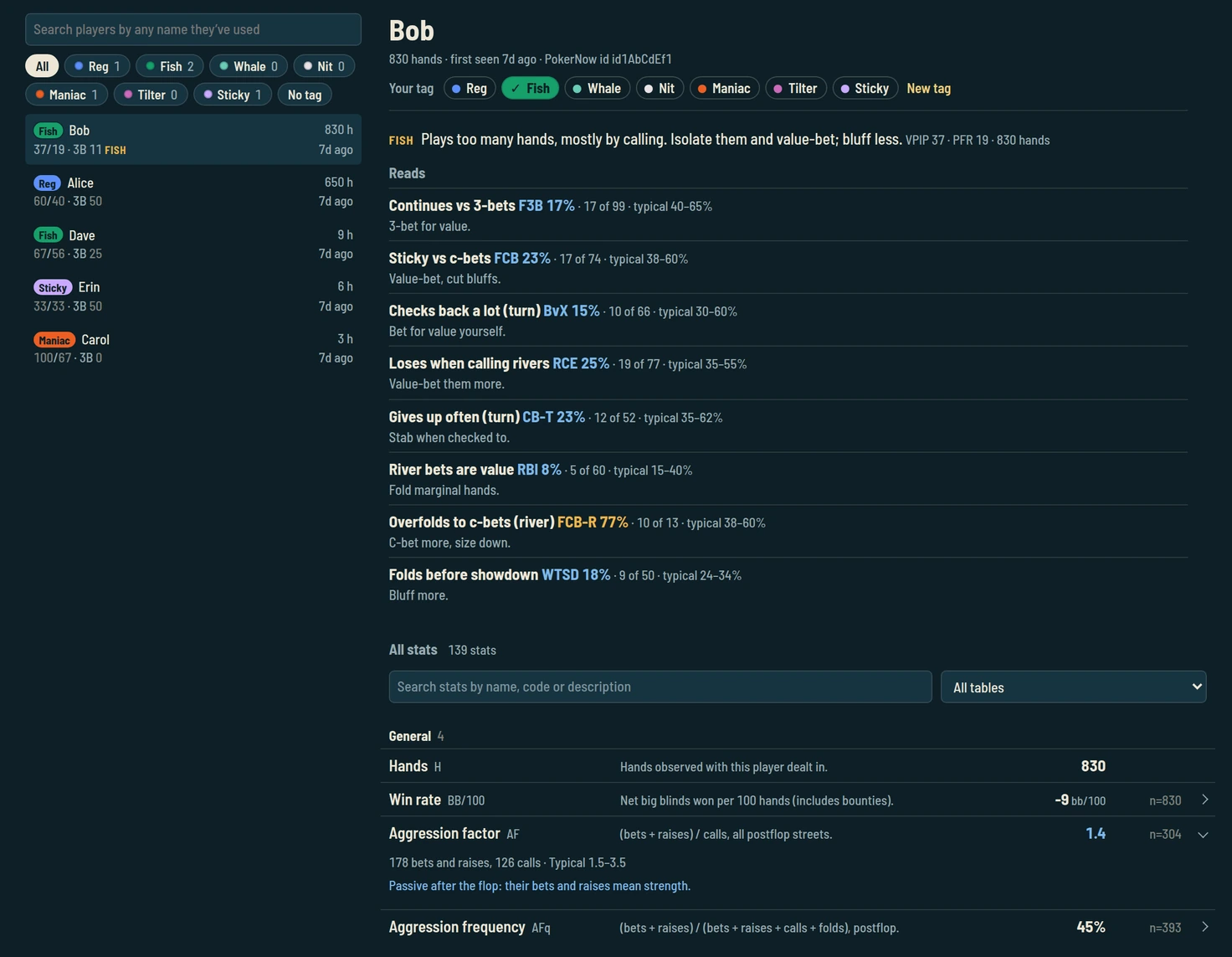
The player database: players with tag chips and types, and one player’s page with their type, your tag, reads and stats.
The player database, with made-up players and your tags.

Know who you’re up against

After 30 hands with a player, their badge shows what kind of player they are: Fish, Whale, Station, Maniac, LAG, TAG, Rock or Nit. Hover the type for how they play and how to play against them. A player whose style sits between two types gets none.

Your own colored tags sit in front of the numbers. Give any player one tag, such as Reg or Fish, and it follows them to every table, even under a new name. You start with six and can make your own in 8 colors. Your tag is your call; the type after the numbers is the HUD’s. Tags stay in your browser and in your backups; they aren’t sent to our servers.

The player panel turns their numbers into reads in plain words, like “Overfolds to 3-bets: 3-bet bluff more.” A read shows up only when a stat is clearly outside its typical range, with at least 12 chances behind it.

It also writes out the hands they showed, telling ones first, such as river bluffs, light calls and slow-played big hands. Open your own badge to see what other players can use against you.

How the HUD picks a player type

Benny64bb
Sticky44/11/6AF0.4WTSD31186 h
FishPassive after the flop

Benny Fish

186 hands with you

Plays too many hands, mostly by calling. Isolate them and value-bet; bluff less.

All stats

Reads

  • Passive after the flop AF0.4Their bets and raises mean strength.
  • Limps a lot OL22%Isolate them.
  • Plays a wide range VPIP44%Value-bet thinner, bluff less.
  • Sticky vs c-bets FCB26%Value-bet, cut bluffs.

Hands they showed

Bluffed the river with 6♠ 5♠

Six-high, no pair · single-raised pot · BTN: called · Flop: called · Turn: called · River: bet 100% · lost 22bb · board A♣ K♦ 9♥ 2♣ 10♣ · 2d ago

Limped with A♠ A♦

Overpair, aces · limped pot · CO: limped · Flop: bet 50% · Turn: bet 66% · River: bet 75% · won 31bb · board J♣ 6♦ 2♥ 9♠ 3♣ · 5d ago

Showed Q♣ 5♣: top pair, queens

Limped pot · SB: limped · Flop: check-called · Turn: check-called · River: check-called · won 9bb · board Q♠ 9♦ 4♣ 7♥ 2♠ · 6d ago

A made-up player’s badge, with your tag Sticky in front of the numbers, and their player panel, without its tag row, notes and profile. Hover the type or any number.

139 stats on every opponent

The HUD keeps VPIP, PFR, 3-bet, fold to 3-bet, c-bet, fold to c-bet, check-raise, aggression factor, went to showdown and won at showdown on everyone you play, plus 129 more: steals and blind defense, squeezes, 4-bets and 5-bets, barrels, donk bets, probes, folds by bet size on every street, and how big they bet.

What each stat means, with typical ranges

Ready in a minute

Add to Chrome
  1. Add it to Chrome

    Install it from the Chrome Web Store. It’s free, and there’s no account to make.

  2. Read the privacy policy

    A window shows it as soon as it’s installed. Nothing is recorded until you agree.

  3. Open a game

    Go to any PokerNow table. The HUD starts on its own and brings in the table’s earlier hands.

Full setup guide, with fixes if the HUD doesn’t show

How it compares

Most other PokerNow HUDs need a paid subscription. This one is free, with 139 stats. Its stats change with the spot you’re in.

Questions

Is there a HUD for PokerNow?

Yes. PokerNow HUD Advanced is a free Chrome extension that adds a heads-up display with spot-aware opponent stats to PokerNow.

Is PokerNow HUD Advanced free?

Yes. It’s free, with no account, no paid tier and no ads.

Which games does it support?

No-Limit Hold’em (NLHE) on pokernow.com. Other games, such as Omaha, aren’t supported.

Does it work on Android or iPhone?

No. It works only in Chrome on a computer: Windows, Mac, Linux or a Chromebook. Chrome on phones and tablets doesn’t run extensions. You can still play PokerNow on your phone, just without the HUD.

Does it have an odds calculator or solver?

No. It doesn’t calculate equity or pot odds, and it doesn’t tell you what to play. It shows opponent stats and, on your turn, how often each opponent folds to each of your bet sizes.

Can it see other players’ cards?

No. It only knows what PokerNow shows everyone at the table: actions, bets and cards turned over at showdown, plus your own cards.

Does it bet for me?

No. A size button opens PokerNow’s bet box with the amount filled in, and the bet only goes in when you confirm it.

Where does my data go?

Your player database is stored in your browser, and everything the HUD shows is read from there. We also do operations on hosted servers: at the start of every hand, the extension sends them what changed, encrypted in transit. Your data is used only to run PokerNow HUD Advanced, and the privacy policy lists exactly what’s sent.

Is it made by PokerNow?

No. It’s an independent tool by WraithRoltz and isn’t affiliated with or endorsed by PokerNow.

Sit down with a read on everyone.

Free for Chrome on your computer. It starts on its own the next time you open a PokerNow table.

Add to Chrome